
Trading journal: A reason for every trade, and a review every Friday
If you want to keep a trading journal and review it every week, CubeLV can build you one that asks for the reason as soon as you trade. Every trade gets a reason card, and every Friday two agents sum up your profit and loss and check whether you followed your plan. The hardest part of a journal is writing down why, so it asks the moment you save.
Your sentence
I want a reason recorded for every trade. After each trade, ask me on a card why I bought or sold, and every Friday review the week's trades, my profit and loss and whether I followed my plan.
Already using CubeLV? Open it and this sentence is filled into the CEO chat box; press Send to start. New to CubeLV? Sign up, then paste the sentence to the CEO.
The CEO asked these first
Where there was a recommended option, we picked it. Where there was none, we left it to the CEO. You can also type your own answer.
How will the system know you made a trade?
Left to the CEOyou enter the trade yourself, and saving it brings up the reason card
Which trades should the Friday review cover?
Left to the CEOTaiwan and US stocks
Where should the Friday review go?
Left to the CEOa note kept in the app, with a push notification when it's done
The blueprint CubeLV drew
The blueprint is the structure of the whole app: which agent does each step, where the data is kept and which step stops to wait for you. Once the app is built, this is your map of it.
The screenshots are real captures of CubeLV in its Traditional Chinese interface; the names and descriptions on this page are translations.
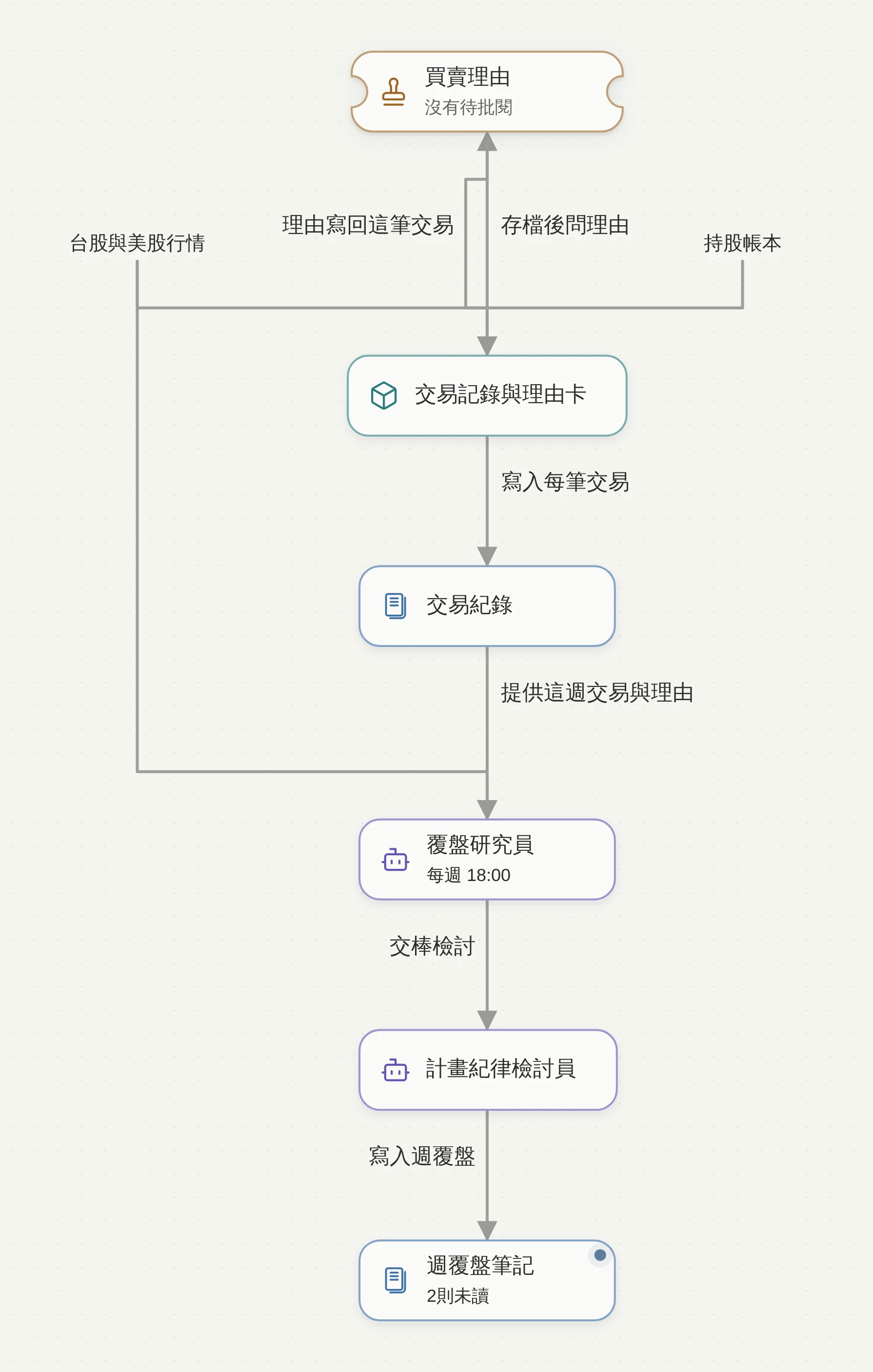
- Data source Taiwan and US stock prices, holdings ledger Prices at the time of each trade, and your holdings.
- Agent Review Researcher Every Friday, pulls together the week's trades, their reasons and the profit and loss, and hands them to the reviewer.
- Agent Plan Discipline Reviewer Checks whether you followed your plan and writes it into the weekly review.
- Plugin Trade Log and Reason Cards Shows how many trades you logged this week, how many still need a reason and your profit and loss; the plus button at the bottom right adds a trade.
- Data Trade Log Every trade and its reason.
- Data Weekly Review Notes One per week.
- Handoff card Trade Reason Pops up each time you save a trade and asks why you bought or sold and what you plan to do; the reason is saved to that trade.
See the screen drafts before anything is built
Drafts show what the screens will look like. The stocks and numbers in them only fill out the layout and are not recommendations. To change something, point at the draft and say it. Nothing is built until you press “Start building”.
PluginTrade Log and Reason Cards
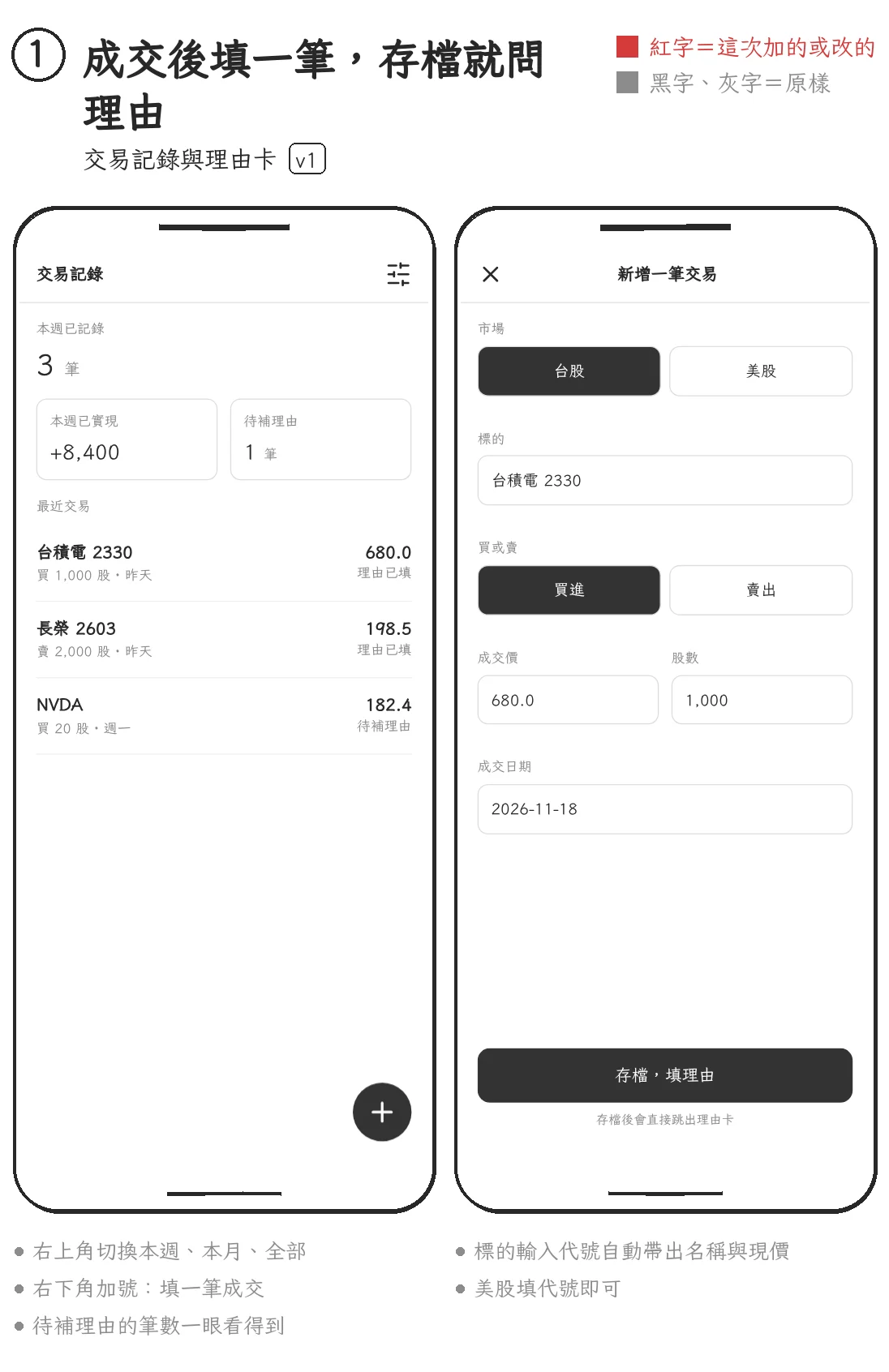
The first screen is the trade log, with this week's trade count, realized profit and loss and the number of trades still missing a reason. Each trade shows whether its reason is filled in. The second screen adds a trade: choose Taiwan or US stocks, enter the ticker, buy or sell, price and number of shares, then press “Save and add reason” to bring up the reason card.
Handoff card: where the app stops for you
Handoff cardTrade Reason
- When it appears
- Pops up every time you save a trade; any you haven't filled in stay under “Needs a reason”.
- What the card shows
- The trade: stock, buy or sell, price and number of shares
- What to fill in: why you bought or sold, and what you plan to do
- What you can press
- Submit reasonsaved to this trade and used in the Friday review
- Skipleave it for now under “Needs a reason”
Doing it by hand vs. with CubeLV
Copy them into an Excel or Notion template yourself.
Add a trade in the trade log; type the ticker and the name fills in.
If you don't write it down at the time, you forget why you bought.
Saving a trade brings up the reason card, and anything not filled in stays under “Needs a reason”.
You look back on the weekend when you remember, and often skip it.
Every Friday the Review Researcher sums up trades and profit and loss, and the Plan Discipline Reviewer checks whether you followed the plan.
Files pile up and you can't find what you were thinking.
The trade log and weekly reviews are all kept, with the reason attached to each trade.
What it does not do
- It does not connect to your brokerage account or place orders; you record trades yourself.
- The review sums up your own records. It is not investment advice.
- Profit and loss is calculated from the price and shares you enter, so a wrong entry gives a wrong result.
Start with this sentence, then make the rules your own
Build it as written, let it run for a day, then tell the CEO what to change.
I want a reason recorded for every trade. After each trade, ask me on a card why I bought or sold, and every Friday review the week's trades, my profit and loss and whether I followed my plan.