
AI stock screening: Screen stocks on your own rules before every open
You set the rules. CubeLV builds a screen that runs by itself before every open: an agent screens on schedule and researches new entries first. You decide what goes on your watchlist.
Your sentence
Every day before the open, screen Taiwan stocks on my rules: revenue up at least 20% year over year and a P/E of 15 or below. Research the new ones first, and ask me before adding any to my watchlist.
Already using CubeLV? Open it and this sentence is filled into the CEO chat box; press Send to start. New to CubeLV? Sign up, then paste the sentence to the CEO.
The CEO asked these first
Where there was a recommended option, we picked it. Where there was none, we left it to the CEO. You can also type your own answer.
How wide should the daily pre-open screen go?
PickedScan all TWSE- and TPEx-listed stocks
When should you be asked whether new entries go on your watchlist?
PickedOne round of questions before the open
Which watchlist group should the picks go into?
PickedA new group called “Screened picks”
The blueprint CubeLV drew
The blueprint is the structure of the whole app: which agent does each step, where the data is kept and which step stops to wait for you. Once the app is built, this is your map of it.
The screenshots are real captures of CubeLV in its Traditional Chinese interface; the names and descriptions on this page are translations.
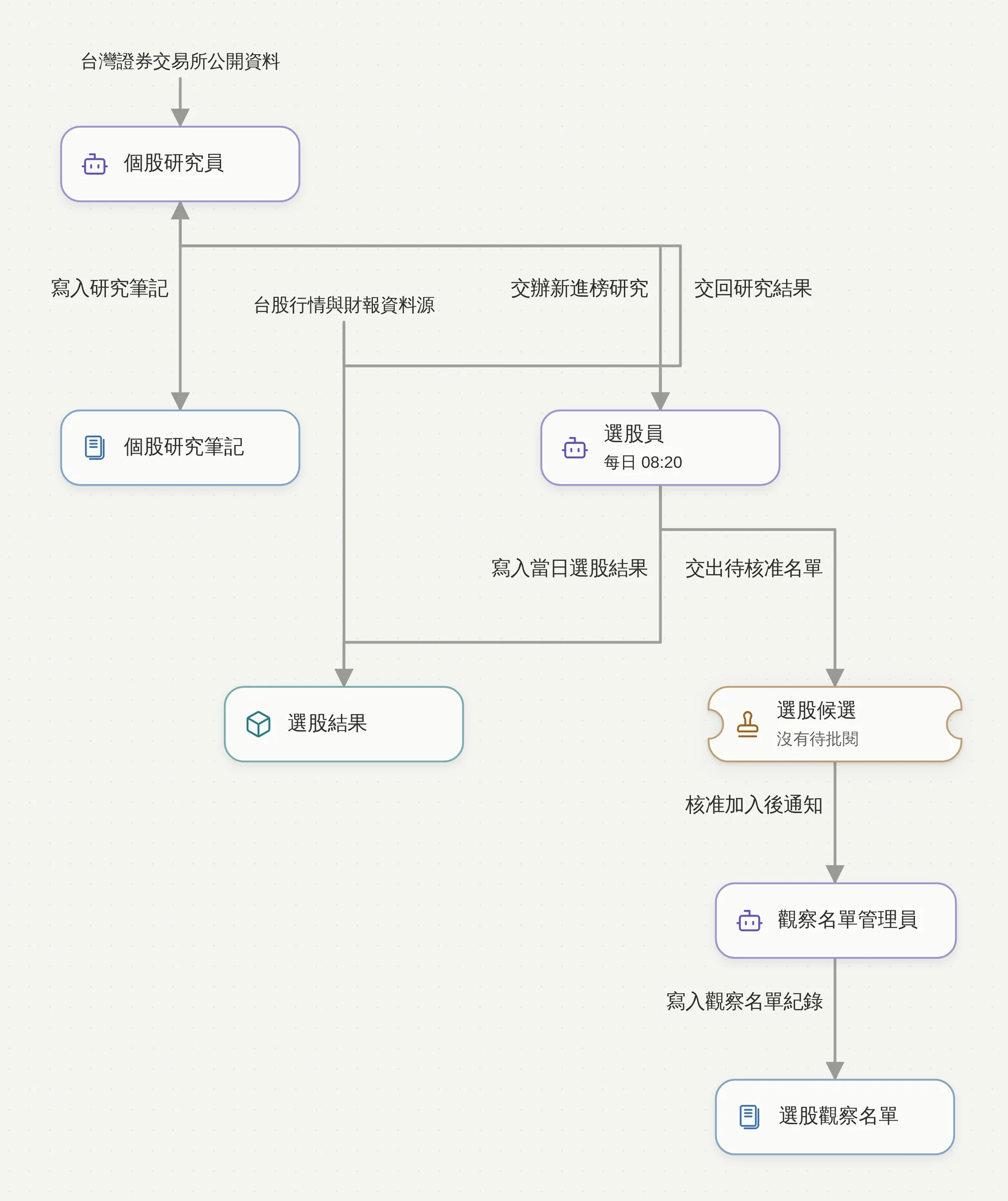
- Data source Taiwan stock quotes and financials, Taiwan Stock Exchange public data Prices, monthly revenue and P/E for listed and OTC stocks.
- Agent Screener At 08:20 every trading day, scans listed and OTC stocks, leaves out ETFs, warrants and stocks under trading restrictions and keeps those with monthly revenue up 20% or more year over year and a P/E of 15 or below. Skips market holidays.
- Agent Stock Researcher Writes a research note on each new entry the Screener hands over.
- Agent Watchlist Manager Once you approve, adds the stock to your “Screened picks” watchlist group and logs it.
- Plugin Screening Results Lists the stocks that meet your rules each day; tap one to see its research summary.
- Data Stock Research Notes Research on every new entry.
- Data Screening Watchlist A record of what you approved.
- Handoff card Screen Candidate One card per new entry; it goes on the watchlist only if you approve.
See the screen drafts before anything is built
Drafts show what the screens will look like. The stocks and numbers in them only fill out the layout and are not recommendations. To change something, point at the draft and say it. Nothing is built until you press “Start building”.
PluginScreening Results
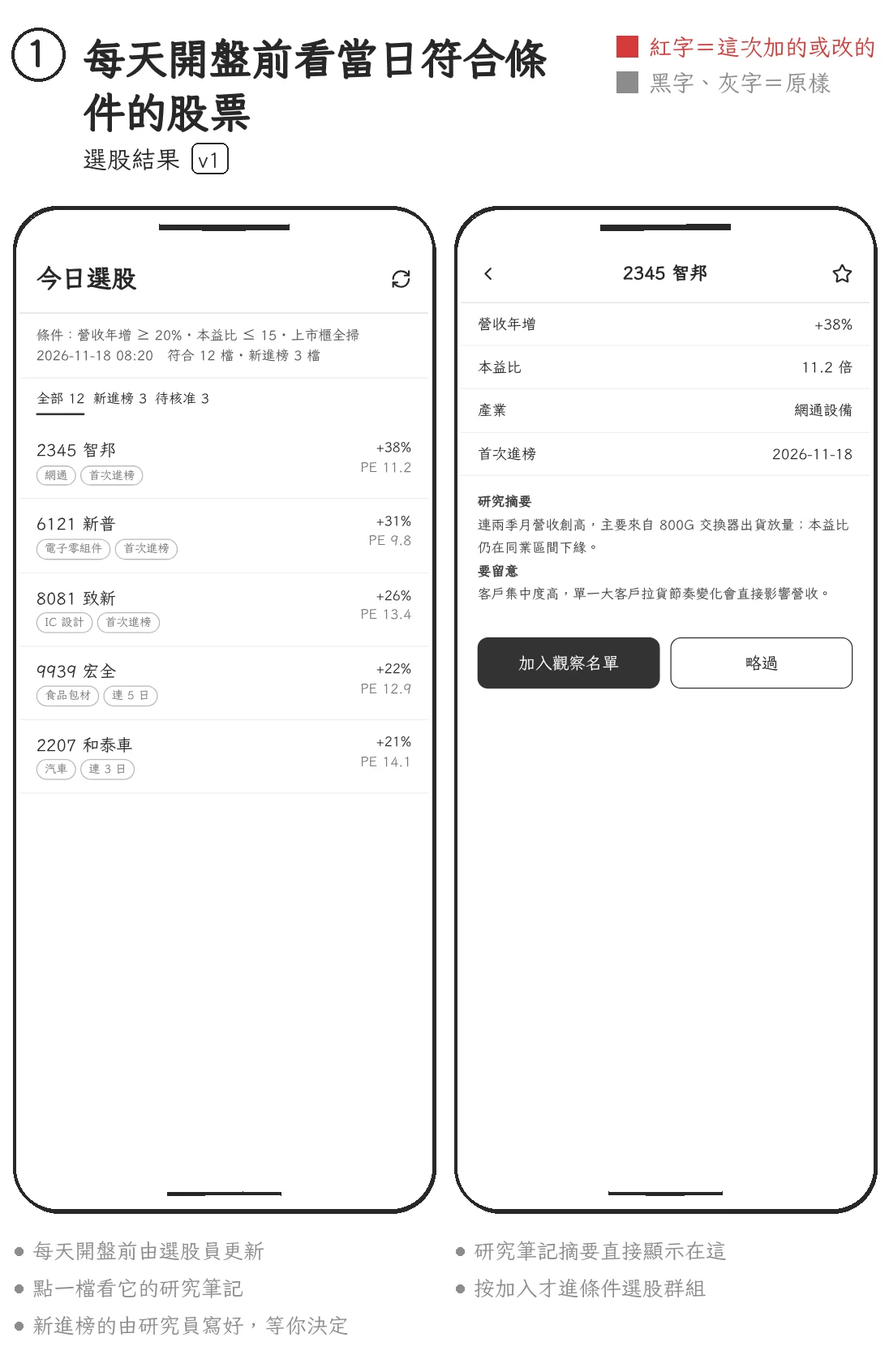
The first screen shows today's matches in three tabs (All, New and To approve), each with its revenue growth and P/E. The second screen opens one stock with its revenue growth, P/E, a research summary and what to watch out for. “Add to watchlist” and “Skip” are at the bottom.
Handoff card: where the app stops for you
Handoff cardScreen Candidate
- When it appears
- After the Screener finishes its pre-open scan, the Stock Researcher writes a note on each new entry, and each one comes to you as its own card under “To review”.
- What the card shows
- Which stock and which rules it met
- A summary of the research note (open the full text to see the evidence)
- What to do: type or say your instructions
- What you can press
- Approvethe Watchlist Manager adds it to the “Screened picks” group and lets you know
- Don't addstop following this one for now
- Skipno decision this time
Doing it by hand vs. with CubeLV
Open a screening site or trading app before the open, reset the filters, run them and copy the results into a spreadsheet.
The Screener scans listed and OTC stocks at 08:20 every trading day and skips market holidays.
Look up revenue, financials and news one stock at a time and write your own notes.
The Stock Researcher writes a note on each new entry and saves it in Stock Research Notes.
Kept in your head or on a sticky note; by the next day you've forgotten why.
One handoff card per stock. It joins “Screened picks” only when you approve, and the reason stays on the card.
One spreadsheet per day makes it hard to see which stocks keep showing up.
Every day's results are kept in the Screening Results plugin, ready to look back on.
Reset the filters, and the old results no longer match the new rules.
Tell the CEO what to change in one sentence. It makes the change, and the next run uses the new rules.
What it does not do
- It does not place orders or tell you which stock to buy.
- You set the rules. It screens by them and does not promise the results will go up.
- It uses the platform's Taiwan stock price and financial data, and cannot use data the platform does not have.
Start with this sentence, then make the rules your own
Build it as written, let it run for a day, then tell the CEO what to change.
Every day before the open, screen Taiwan stocks on my rules: revenue up at least 20% year over year and a P/E of 15 or below. Research the new ones first, and ask me before adding any to my watchlist.