
Dividend portfolio tracker: Dividends, ex-dividend dates and yield, recorded for you
If you need to track dividends, ex-dividend dates and yield on a dividend portfolio, CubeLV can build you a dividend app that keeps the records itself. Tell it once which stocks you hold and how many lots (1 lot = 1,000 shares). It works out dividends, ex-dividend dates and yield, and stops to ask about any stock that falls below your threshold.
Your sentence
I hold 10 lots each of 0056, 00878 and Mega Financial (2886). Record every dividend and remind me a week before each ex-dividend date. Once a month, work out the yield and the dividends I've received this year. If a stock's yield falls below 4%, ask me before dropping it from my dividend list.
Already using CubeLV? Open it and this sentence is filled into the CEO chat box; press Send to start. New to CubeLV? Sign up, then paste the sentence to the CEO.
The CEO asked these first
The sentence already says which stocks, how many lots of each and the threshold, so the CEO asked nothing. It looked up the holdings and this year's dividends, recorded them in Dividend Log and went straight to the blueprint.
The blueprint CubeLV drew
The blueprint is the structure of the whole app: which agent does each step, where the data is kept and which step stops to wait for you. Once the app is built, this is your map of it.
The screenshots are real captures of CubeLV in its Traditional Chinese interface; the names and descriptions on this page are translations.
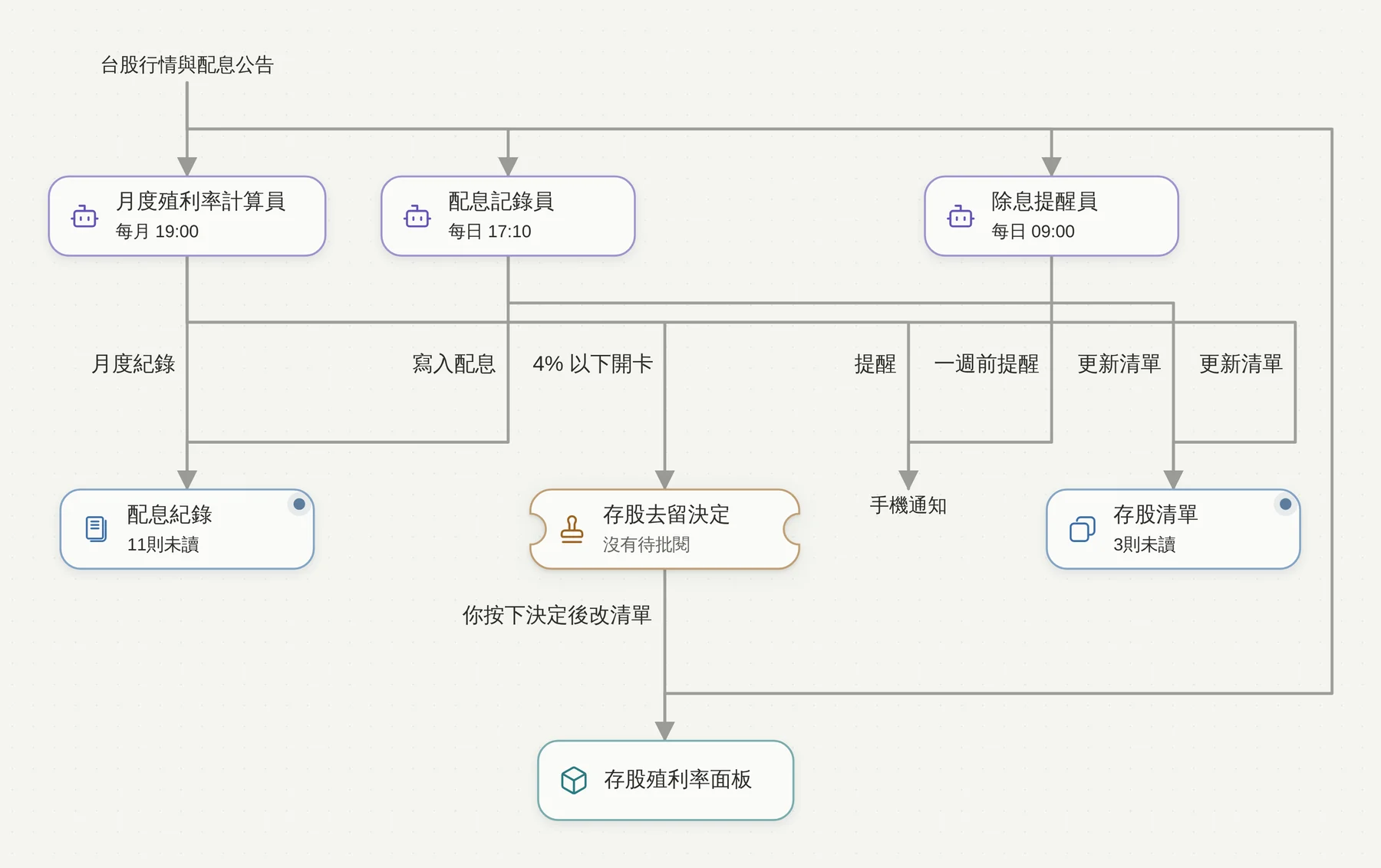
- Data source Taiwan stock prices and dividend announcements Closing prices, ex-dividend dates and the amount of each dividend.
- Agent Dividend Recorder Records the actual amount of each dividend based on your lots, and updates the dividend list.
- Agent Ex-dividend Reminder Sends a phone notification a week before each ex-dividend date.
- Agent Monthly Yield Calculator Once a month, works out each stock's yield and the dividends received this year; if a yield falls below 4%, opens a handoff card.
- Plugin Dividend Yield Dashboard One card per stock with lots, current price, yield and dividends received this year.
- Data Dividend Log Details of every dividend and a yearly summary.
- Data Dividend List The stocks you hold for dividends and their status (Holding or Watching).
- Handoff card Keep or Drop When a stock falls to your yield threshold, asks whether to keep holding it or drop it.
See the screen drafts before anything is built
Drafts show what the screens will look like. The stocks and numbers in them only fill out the layout and are not recommendations. To change something, point at the draft and say it. Nothing is built until you press “Start building”.
PluginDividend Yield Dashboard
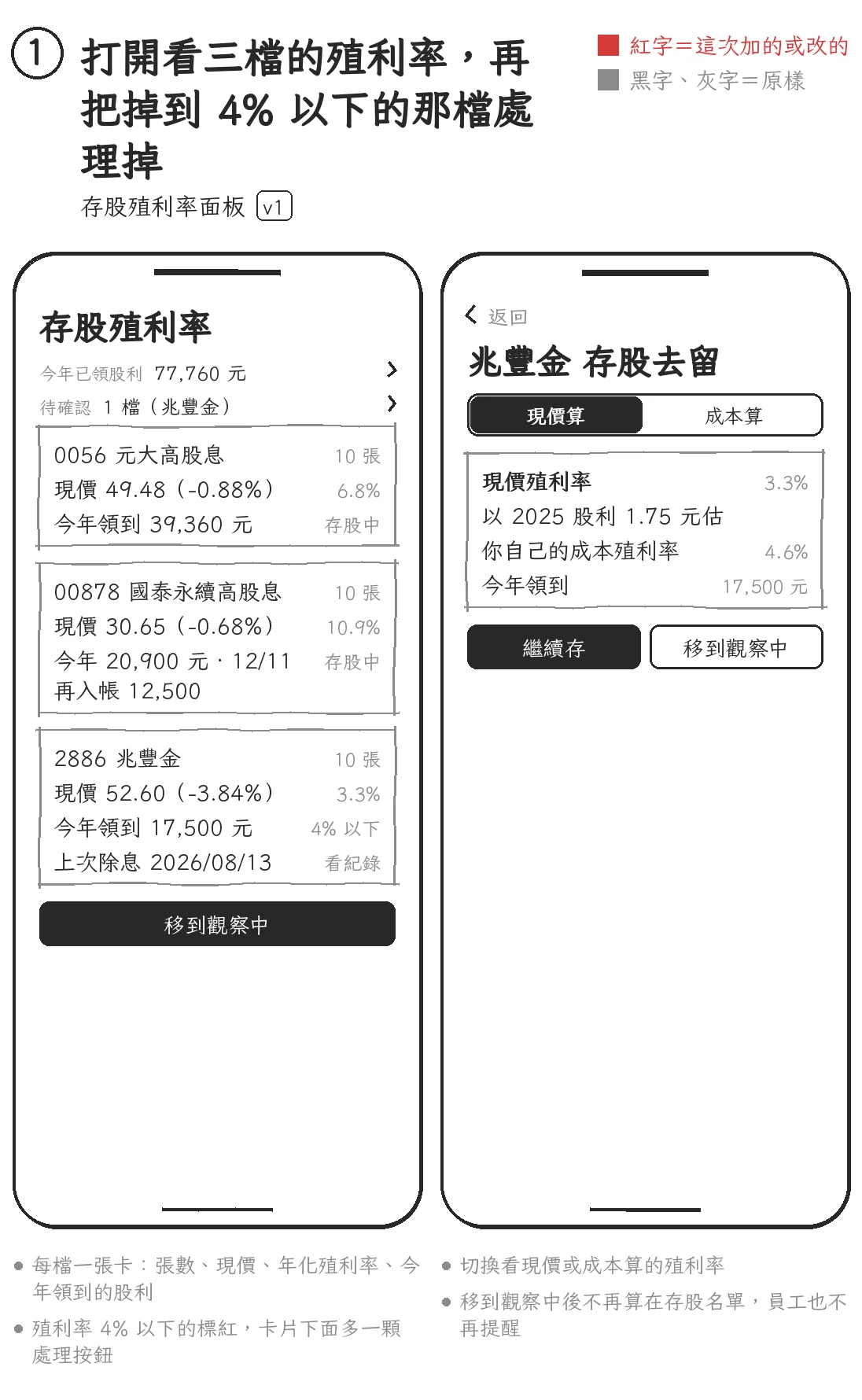
The first screen has one card per stock with lots, current price, yield and dividends received this year; anything below 4% is marked in red. The second screen opens that stock and lets you switch between yield on the current price and yield on your cost, then choose “Keep holding” or “Move to watching”.
Handoff card: where the app stops for you
The actual handoff card
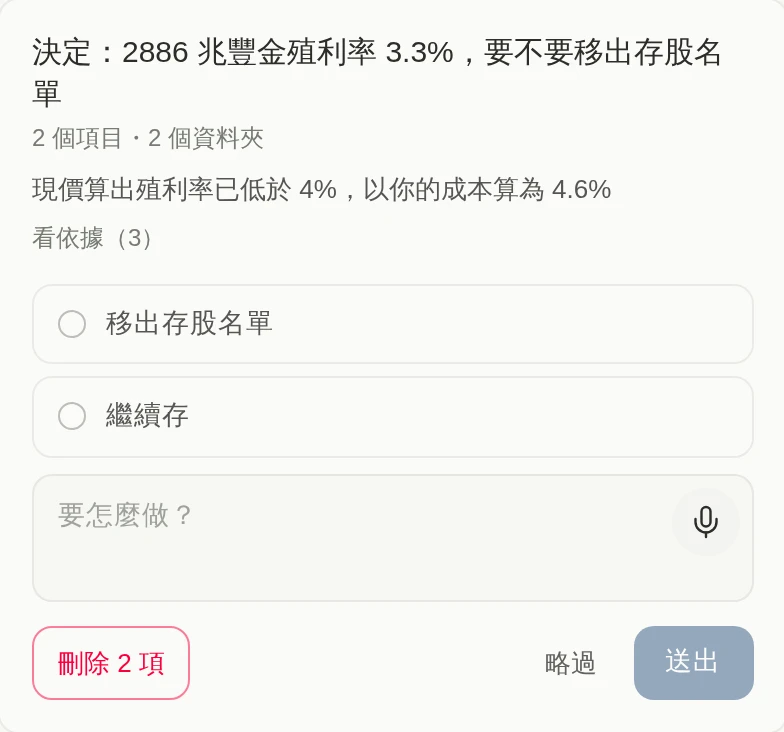
Handoff cardKeep or Drop
- When it appears
- When the Monthly Yield Calculator finishes the month, any stock yielding below 4% gets a card. This time it was Mega Financial: 3.3% on the closing price, 4.6% on your cost.
- What the card shows
- Which stock and its yield, worked out on both the current price and your cost
- Evidence: the dividend records and data used for the yield
- What to do: type or say your instructions
- What you can press
- Drop from dividend list
- Keep holding
- Skipno decision this time
Doing it by hand vs. with CubeLV
After each payment, open your bankbook or broker app and copy it into a spreadsheet.
The Dividend Recorder logs the actual amount of every payment based on your lots.
Look up ex-dividend dates yourself and put them in your calendar.
The Ex-dividend Reminder sends you a push notification a week before.
Recalculate every month from the current price and dividends, and often forget.
The Monthly Yield Calculator does it every month, on both the current price and your cost.
You only think to check once you notice the yield has dropped.
When a stock falls to your threshold you get a handoff card, and you press “Keep holding” or “Move to watching”.
What it does not do
- It does not buy or sell for you, or suggest which stocks to hold.
- Yield is based on the platform's closing prices and dividend announcements; dividends not yet announced are not counted.
- You enter your cost in the holdings ledger yourself. If you leave it blank, yield on cost uses a reference price.
Start with this sentence, then make the rules your own
Build it as written, let it run for a day, then tell the CEO what to change.
I hold 10 lots each of 0056, 00878 and Mega Financial (2886). Record every dividend and remind me a week before each ex-dividend date. Once a month, work out the yield and the dividends I've received this year. If a stock's yield falls below 4%, ask me before dropping it from my dividend list.