
Institutional flow screen: Find stocks investment trusts keep buying while foreign investors buy too
Going through the daily institutional trading tables to find buying streaks takes time. CubeLV builds an app that screens by itself after the close. It lists only stocks that investment trusts (Taiwan's domestic fund managers) keep buying, that foreign institutional investors are also buying and that trade enough volume, and they go on your watchlist only when you say yes.
Your sentence
Every day after the close, find stocks that investment trusts have net bought three days in a row and that foreign investors are also buying. Leave out thinly traded ones, and ask me before adding any to my watchlist.
Already using CubeLV? Open it and this sentence is filled into the CEO chat box; press Send to start. New to CubeLV? Sign up, then paste the sentence to the CEO.
The CEO asked these first
Where there was a recommended option, we picked it. Where there was none, we left it to the CEO. You can also type your own answer.
When the system finds stocks that meet the rules, what do you want to see first?
Left to the CEOa daily list with how many days in a row investment trusts have bought, how many lots (1 lot = 1,000 shares) foreign investors bought, and volume
How do you want to define “thinly traded”?
Left to the CEOanything averaging 1,000 lots a day or less is left out
The blueprint CubeLV drew
The blueprint is the structure of the whole app: which agent does each step, where the data is kept and which step stops to wait for you. Once the app is built, this is your map of it.
The screenshots are real captures of CubeLV in its Traditional Chinese interface; the names and descriptions on this page are translations.
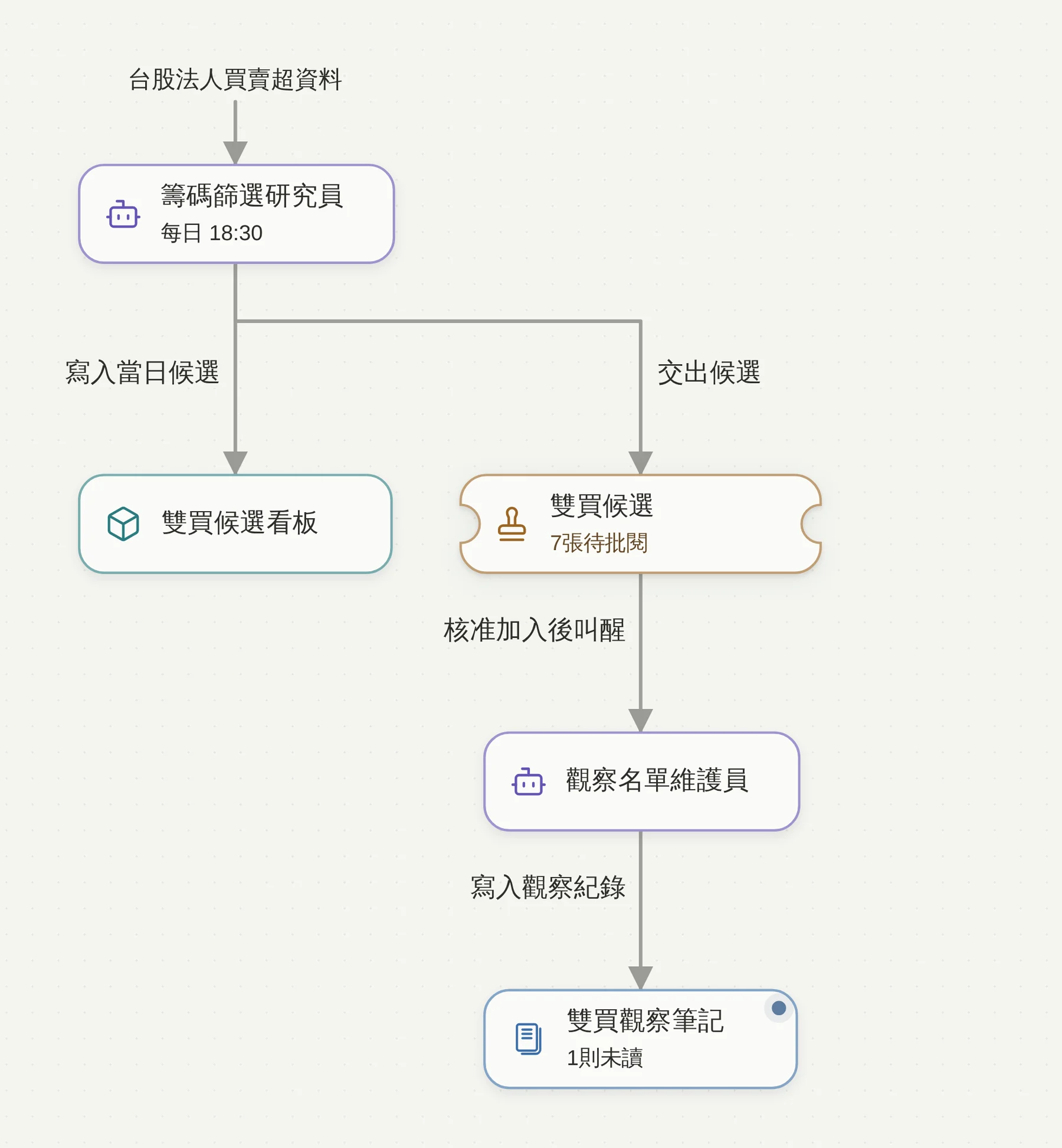
- Data source Taiwan institutional trading data Net buying and selling by the three major institutional investor groups (foreign investors, investment trusts and dealers) and volume, published after each close.
- Agent Flow Screening Researcher At 18:30 every day, finds stocks that investment trusts bought three days in a row, that foreign investors are also buying and that average 1,000 lots a day or more, then writes them onto the board and hands over the candidates.
- Agent Watchlist Keeper Once you approve, adds it to your watchlist and writes a watch note.
- Plugin Dual-buy Candidates Board Today's candidates, sorted by foreign net buying; tap one to see its close, 10-day trend and flow figures.
- Data Dual-buy Watch Notes The stocks added to the watchlist and their institutional flows at the time.
- Handoff card Dual-buy Candidate Each candidate stops to ask whether to add it to your watchlist.
See the screen drafts before anything is built
Drafts show what the screens will look like. The stocks and numbers in them only fill out the layout and are not recommendations. To change something, point at the draft and say it. Nothing is built until you press “Start building”.
PluginDual-buy Candidates Board
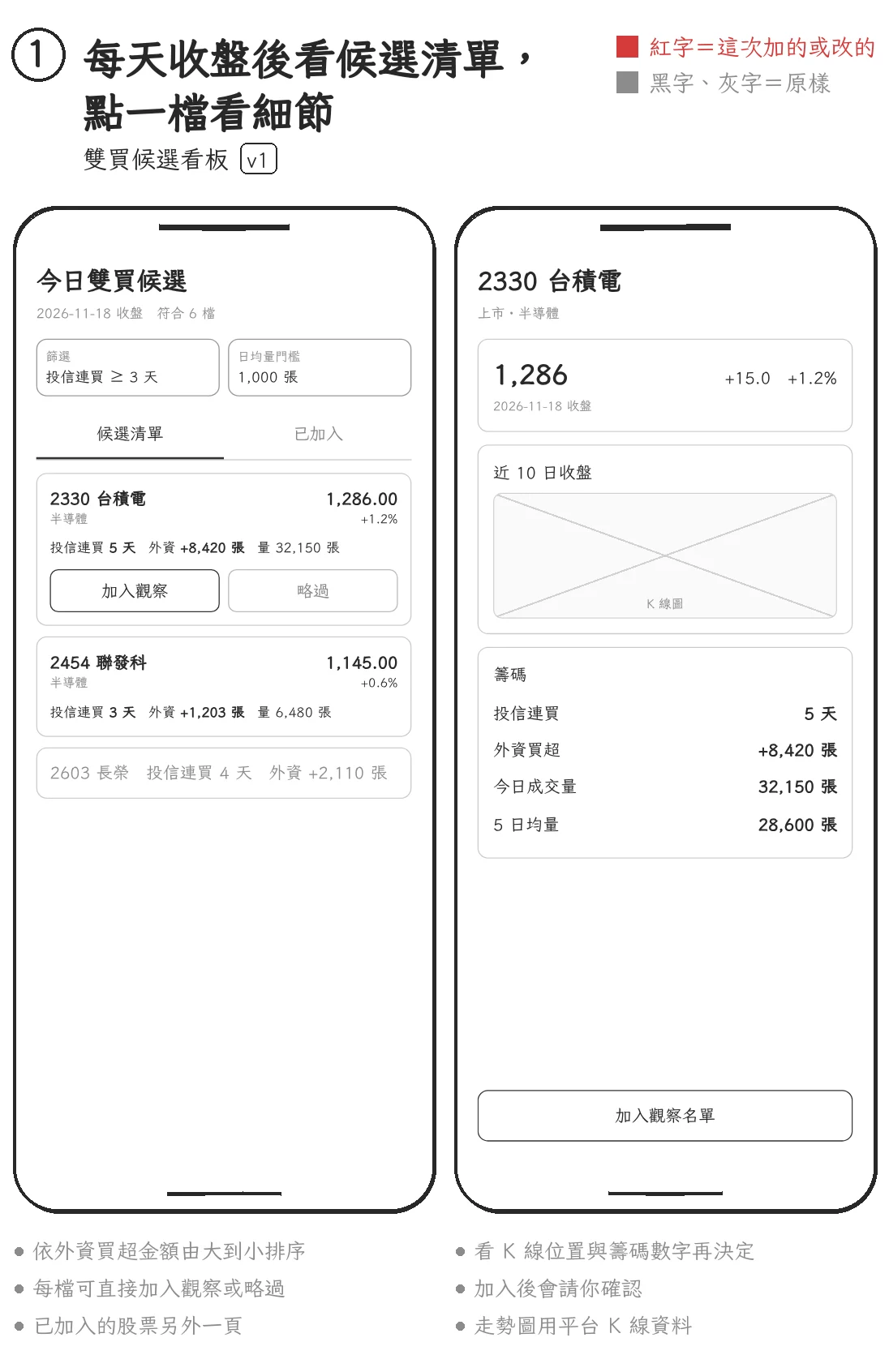
The first screen shows today's dual-buy candidates after the close, with the screening rules and volume threshold at the top. Each stock lists how many days in a row investment trusts have bought, foreign net buying and volume, and you can press “Watch” or “Skip” right there. The second screen opens one stock with its close, 10-day trend and flow figures to help you decide.
Handoff card: where the app stops for you
The actual handoff card
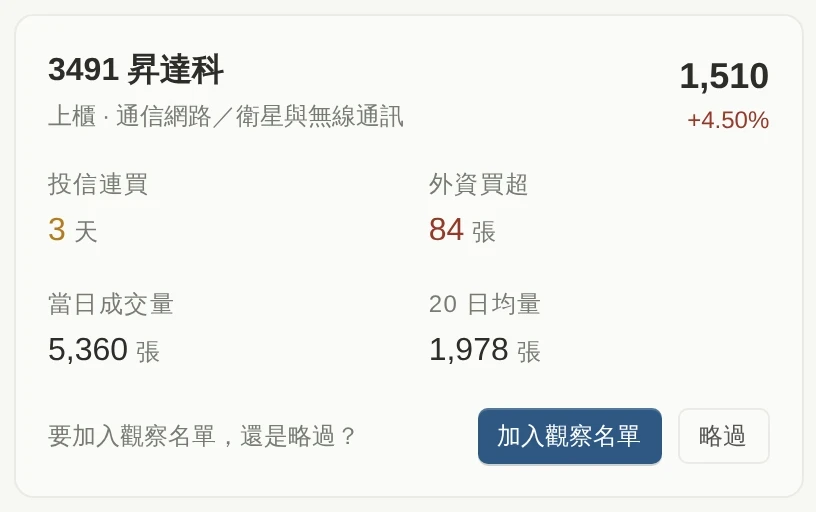
Handoff cardDual-buy Candidate
- When it appears
- The Flow Screening Researcher hands over candidates at 18:30 every day, one card per stock, under “To review”. The first run after building produced 7 cards.
- What the card shows
- Which stock, its industry, closing price and change
- How many days in a row investment trusts have bought, and how many lots foreign investors bought
- The day's volume and 20-day average volume
- What you can press
- Add to watchlistthe Watchlist Keeper adds it and writes a watch note
- Skipdon't add this one for now
Doing it by hand vs. with CubeLV
After every close, go through the institutional trading tables and count how many days investment trusts bought each stock.
The Flow Screening Researcher works it out after the close.
Then check whether foreign investors were buying too.
Both are compared in the same data, and a stock is listed only when both are buying.
Check the volume again yourself.
Anything averaging 1,000 lots a day or less is left out automatically; ask the CEO to change the threshold.
Copy it into your watchlist, with no record of why you added it.
One handoff card per stock; it is added only when you approve, and the watch note is kept.
What it does not do
- It does not trade along with institutional investors for you, or say which stock will go up.
- Institutional trading is published only after each close, so the screen uses after-close data, not intraday data.
- You set the rules and thresholds; tell the CEO any time to change them.
Start with this sentence, then make the rules your own
Build it as written, let it run for a day, then tell the CEO what to change.
Every day after the close, find stocks that investment trusts have net bought three days in a row and that foreign investors are also buying. Leave out thinly traded ones, and ask me before adding any to my watchlist.